by Wavefront Software
When you think of a LIMS, you may think about testing and data, but what about the instruments used to complete the testing? Any lab that deals with auditing, such as ISO 17025 or Nadcap, knows the importance of tracking instruments. They need to identify what instrument was used for each test and the active calibration at the time of testing.
Good news! Some LIMS solutions, such as Wavefront LIMS, have created an Instrument Calibration module that integrates with testing. This makes maintaining calibrations, as well as the documentation of the active calibrations during testing, a breeze. Even better, everything is in one system!
Every LIMS provider, that offers such a feature, is going to have their own take on how to address it. Below shows information specific to the LIMS offered by Wavefront Software to provide an example of one method. It is important to compare your laboratory’s needs against what the LIMS provider offers for each module.
Capturing All Information
Each instrument is different from the next, so it is important to be able to capture the appropriate information. Some examples are: how the calibration is to be completed (in house or outsourced), important notes about the instrument and how it should be handled, and notes about the calibration (i.e. if there was any maintenance done as part of the calibration or recommendations for future calibrations). Wavefront LIMS is highly configurable, so the user can create new fields as needed.
Track Upcoming Calibrations
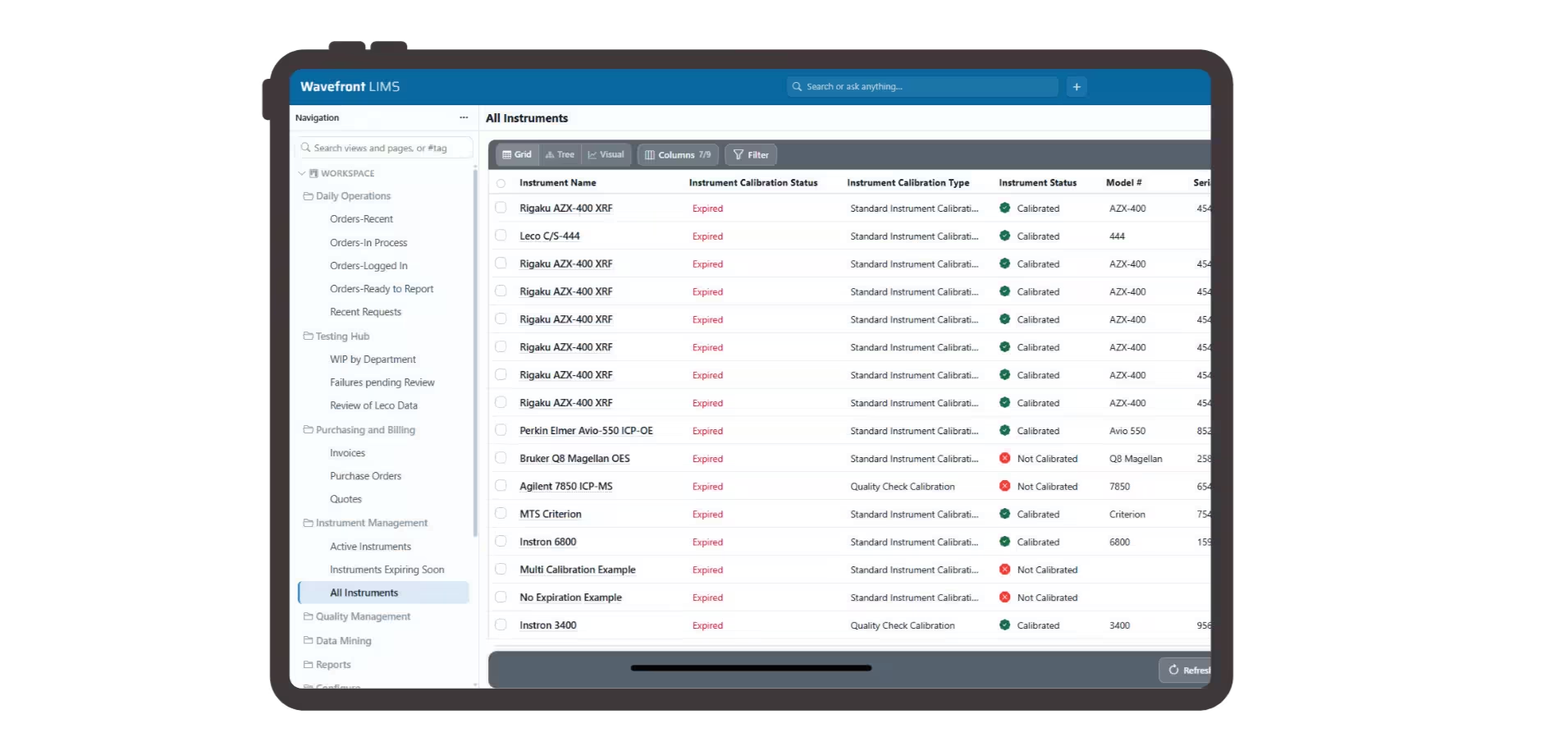
Wavefront LIMS offers a report that identifies the instruments that are expired or are going to expire within the next few months. This is a helpful tool for forward planning of any laboratory.
The interface itself makes expired instruments easy to see at a glance. Color coding the instrument list shows any expired instrument as red.
Applying Instruments to Tests
In Wavefront LIMS, users can select calibrated instruments at the test level. Therefore, a review of the test will include what instrument was used. Each selection also includes the date of the calibration that was then active. This provides an easy view of pertinent information in one spot.
Frequently Asked Questions
Which LIMS include integrated instrument calibration tracking?
Look for a LIMS that stores each instrument’s calibration record, warns you before calibrations expire, and records which calibrated instrument was used on every test. Wavefront LIMS tracks in-house and outsourced calibrations, reports instruments expiring in the coming months, shows expired instruments in red, and saves the active calibration date with each test result. See calibration tracking in a demo.
How does a LIMS track instrument calibrations?
A LIMS keeps a record for every instrument, including calibration method, due date and maintenance notes, and links instruments to the tests they’re used on. That way, an audit shows exactly which calibrated instrument produced each result. In Wavefront LIMS, users select calibrated instruments at the test level, and reviewers see the instrument and its calibration date in one place.
Keep Instrument and Calibration Records in One System
Tracking instruments and their calibrations inside your LIMS means every test result is tied to a calibrated instrument, expiring calibrations are flagged before they become a problem, and audit records are always ready. With LIMS instrument integration, results can also flow directly from those calibrated instruments into the LIMS, with no manual entry. Schedule a demo to see how Wavefront LIMS can bring your instrument and calibration data together in one place.

A LIMS workflow helps laboratories automate and standardize the entire sample lifecycle, from sample receipt and testing to approvals and final reporting. Learn how workflow automation improves traceability, reduces manual work, and increases laboratory efficiency.

Are manual spreadsheets slowing down your lab? Discover the strategic benefits of LIMS (Laboratory Information Management System). From calculating ROI and automating workflows to ensuring ISO 17025 compliance, this guide explains how moving away from Excel streamlines operations, reduces errors, and future-proofs your laboratory for growth.

Struggling with lab errors? Learn how to reduce lab errors using proven strategies like instrument integration, workflow automation, and real-time validation. Improve data accuracy, eliminate manual processes, and streamline your laboratory operations with a modern LIMS.
-
Small laboratories often struggle with manual processes, believing LIMS software is too expensive. This article explains why a modern LIMS for small labs is essential for efficiency and compliance. Learn how no-code configuration, cloud security, and ROI-focused features can professionalize your lab without the heavy IT burden.